


Getting Started
AI answers
Give readers a focused Assistant that answers from the help they can see.
Docent can answer questions from your help center. Search remains an instant way to find a page; the Assistant opens beside the docs in a full-height panel where longer answers, code samples, sources, and follow-up questions have room to breathe.
Open search, type a question, then choose Ask Assistant beside the search field or beneath the results. Readers can also open an empty Assistant from the top bar or press Cmd/Ctrl+I. Cmd/Ctrl+K still opens search.
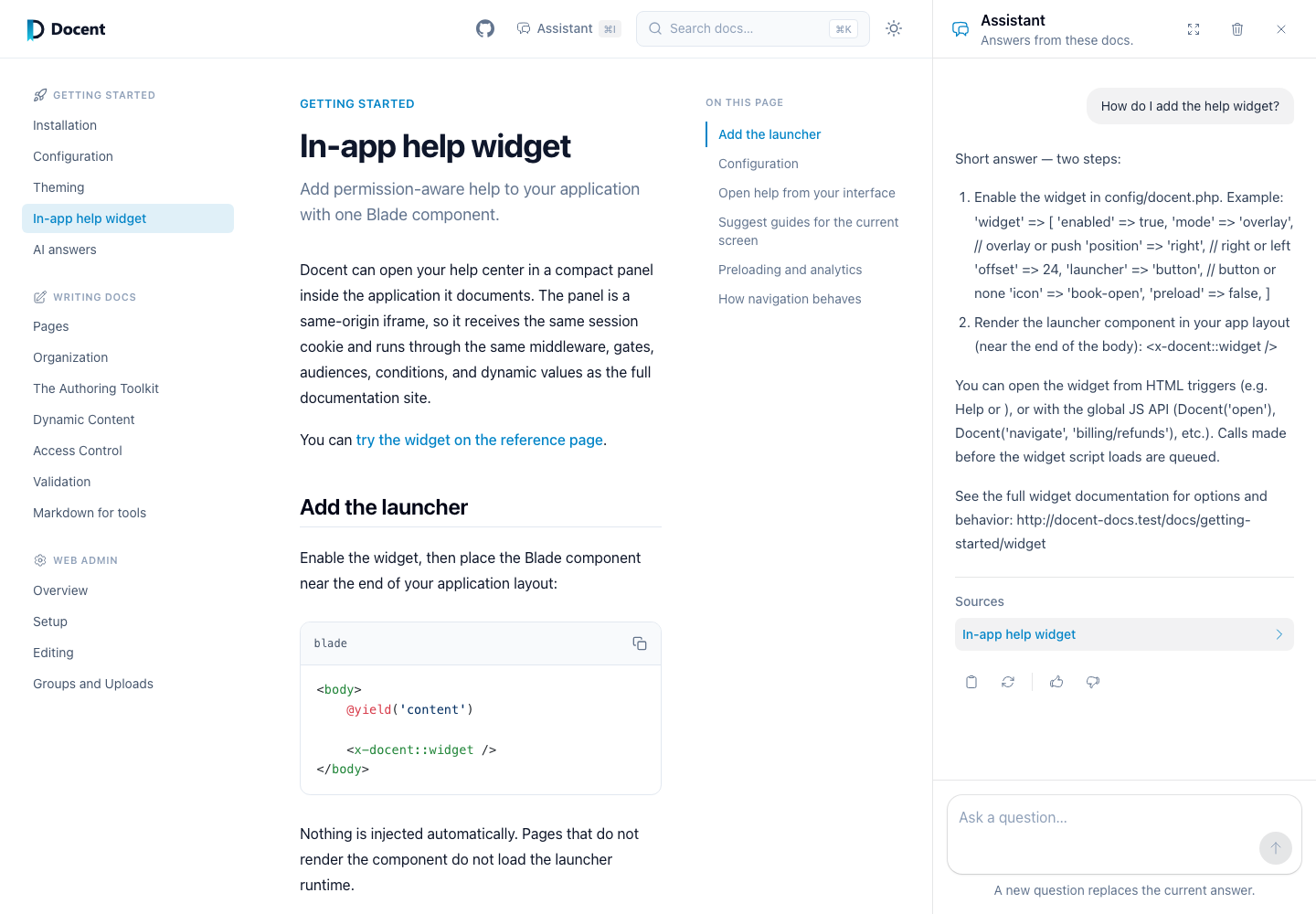
The help widget uses the same flow. Asking switches the existing widget to an Assistant view instead of opening a drawer inside a drawer. Following a source stays inside the widget.
The Assistant remembers completed turns within one temporary help session, so a reader can ask “What happens after that?” without restating the first question. It is still deliberately smaller than a general chatbot: there are no named threads, saved transcript library, cross-device history, or long-term memory. The panel keeps enough browser state to repaint the conversation after navigation, while the server remains the authority for what may be sent back to the model.
By default, a session expires after two hours. Starting a new conversation clears it immediately. Signing out, changing viewer access, changing the visible documentation, or moving between the reader and widget prevents old context from carrying into the new scope.
What grounds the answer
The model receives only the pages the current viewer is allowed to read — the same permission-pruned content that backs agent access. Gated pages and gated blocks are absent from the prompt by construction, so an answer can never be synthesized from content the viewer can't see. A billing admin asking about billing gets an answer from the billing docs; a member asking the same question gets an honest "the docs available to you don't cover that."
Source citations are validated the same way: Docent supplies the model an allowed list of the viewer's visible page URLs. A model-authored link becomes clickable only when it exactly matches one of those URLs. Made-up, external, and unsafe links remain plain text.
Generated Markdown is rendered separately from authored documentation. Raw HTML is removed, unsafe URL schemes are disabled, and headings, lists, blockquotes, inline code, and fenced code are supported. Code blocks include a copy control in the panel.
Enabling it
The feature is off by default and uses your own provider key through Prism, which Docent suggests but never requires:
composer require prism-php/prism
Configure a provider in config/prism.php per Prism's documentation, then turn
Docent's corner of it on:
'ai' => [
    'enabled' => true,
    'provider' => env('DOCENT_AI_PROVIDER'),
    'model' => env('DOCENT_AI_MODEL'),
],
Any provider Prism supports works. If enabled is true and Prism isn't
installed, Docent fails loudly at the first ask rather than degrading silently.
When it's false, the ask endpoints aren't registered at all.
The ai section is a shared setting that any site can override, so one site
can offer the Assistant while another leaves it off. Answers are grounded in
the current site's corpus alone, filtered to what the viewer may see, and the
question log records which site each question came from.
The question log
Every question is logged by default — the question text, whether it was answered, the viewer class (guest or authenticated), and thumbs feedback from the chips under each answer. Run Docent's migrations to create the table:
php artisan vendor:publish --tag=docent-migrations
php artisan migrate
Answers and transcripts are never stored in the question log; it keeps an
answer hash for spotting repeat questions. Over time the log shows you what
people ask that the docs don't answer — that's the roadmap for your next pages.
Set log_questions => false to disable all question-log writes.
Conversation memory is separate and short-lived. Complete user and assistant pairs live in your configured Laravel cache until the session expires. The browser stores an opaque signed token plus enough completed messages to repaint the panel, but it never supplies a transcript for Docent to trust or forward to the model.
Tuning
'ai' => [
    // ...
    'language' => null,
    'log_questions' => true,
    'max_tokens' => 1200,
    'throttle' => '10,1',
    'corpus_budget' => 150000,
    'answer_ttl' => 300,
    'retrieval' => [
        'max_pages' => 8,
        'candidate_limit' => 24,
        'debug' => false,
    ],
    'conversation' => [
        'ttl' => 7200,
        'max_turns' => 10,
        'history_budget' => 12000,
    ],
],
Asks are rate limited per user (per IP for guests) — '10,1' allows ten
questions per minute. Identical questions within answer_ttl seconds replay
the cached answer without touching your provider. Follow-up cache keys also
include the retained conversation history, so identical wording in different
contexts cannot reuse the wrong answer.
language controls what language answers arrive in: leave it null for the
docs' own language, set 'viewer' to follow the application locale, or pin a
fixed code like 'de'. Localization has the full story.
conversation.ttl controls the temporary session lifetime in seconds.
max_turns and history_budget bound what Docent retains and sends to Prism.
When either limit is reached, Docent removes the oldest complete question and
answer pairs. It does not create a hidden summary of discarded turns.
Docent searches the current viewer's index before every answer. It ranks the
question directly, gives the open page a modest boost, and uses the previous
question when the new one looks like a follow-up. retrieval.max_pages caps
the selected pages, while corpus_budget caps their combined prompt content in
estimated tokens. When a selected page is too large, Docent uses its strongest
matching section as a bounded excerpt instead of dropping later navigation
items blindly.
Set retrieval.debug to true while tuning relevance. The citations stream
then includes selected slugs, section anchors, rounded scores, ranking reasons,
and counts—never documentation body content. Leave it off in normal use.
Dynamic values reach the model in their placeholder form, and the model is instructed never to invent a viewer-specific value. Your users' account data is not part of the prompt.
Published view changes
If your application published Docent's Blade views before this Assistant was
introduced, refresh or merge the package views before enabling it. The former
partials/ask-answer.blade.php search partial has been replaced by
partials/assistant-panel.blade.php and
partials/assistant-content.blade.php. Search and widget search now hand a
question to that separate Assistant state instead of rendering an answer in
their own result containers.